Amaryn Pulse — Server Monitor
Pulse.
Know the moment your server goes down. And why.
Players, TPS and memory at a glance, whenever you think to look. An alert when something breaks, with the 15 minutes before it so you can see what led up to it. And the rest of the time — most of the time — the quiet of not having to check.
iPhone and iPad, iOS and iPadOS 26. Sign in with Apple — and nothing to create on the server side.
The app
What it actually looks like.
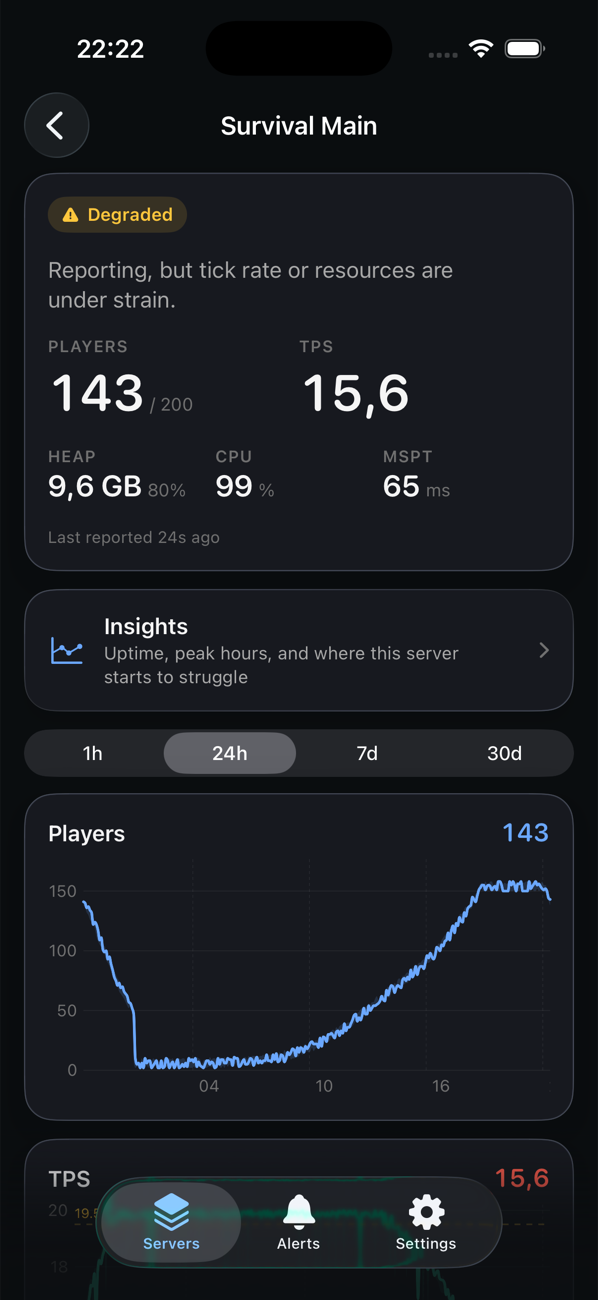
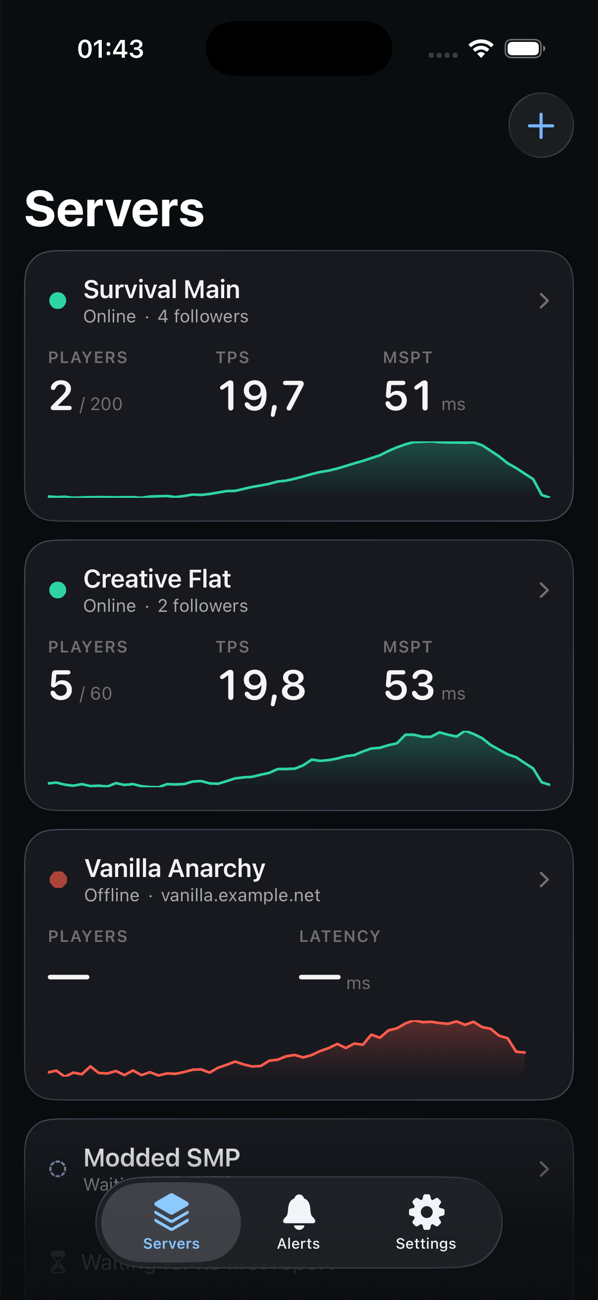
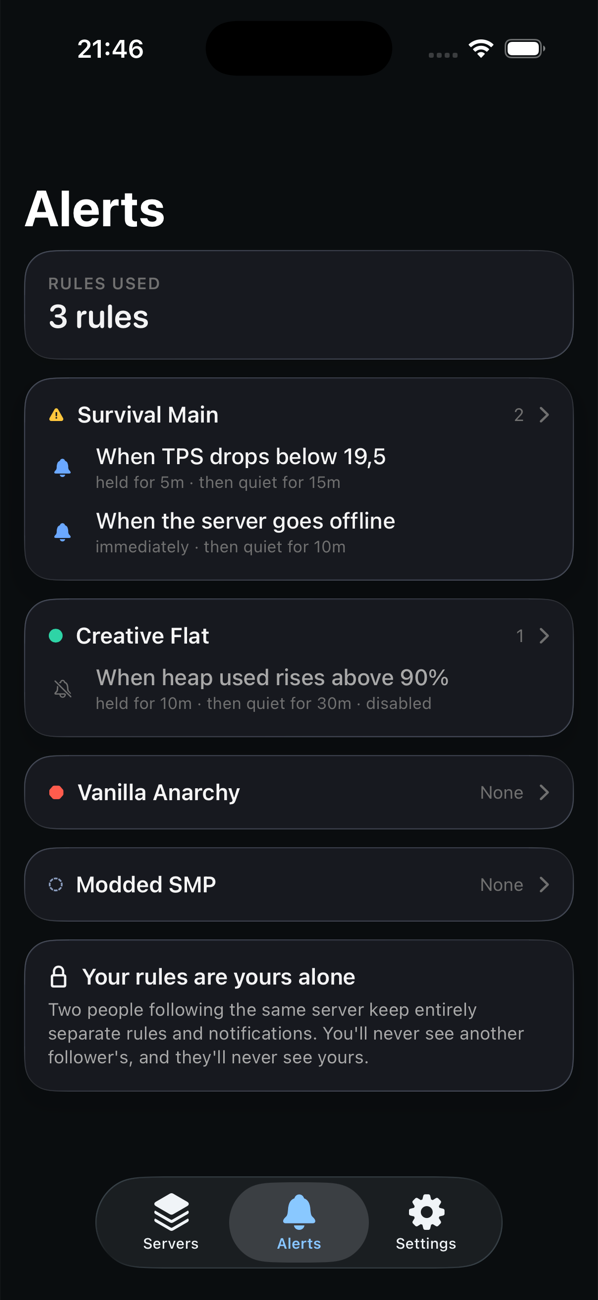
Four servers, one of them offline. A tick rate that has started to slip. Your own alert rules, separate from everyone else's. No dashboard to log into.
The problem
You find out your server is down when a player messages you.
By then it has been an hour. And even once you know, you still do not know why — whether memory was climbing, whether TPS collapsed first, or whether it was the plugin that went in that afternoon.
-
A web dashboard means opening a laptop. And no push notifications. So the server sits down for an afternoon.
-
Server-list ping sites only tell you the port answers. A server can be up and completely unplayable.
-
Infrastructure monitoring watches the machine, not the game. CPU and disk can look perfectly healthy while TPS is on the floor — and it lives on a dashboard nobody has open on a Saturday night.
Setup
Three steps, and the third one is typing a code.
No API keys, no config files to edit beyond dropping the plugin in, and nothing to create on the server side. You sign in to the app with Apple; the code does the rest.
- 01
Install the plugin
Drop it in your plugins folder and start the server. No config file to edit, no API key to copy.
- 02
Run one command
In-game or in the console. It gives you a six characters code, good for 10 minutes.
- 03
Enter the code
In the app. That is the entire setup — live data, history and alerts from that moment on.
Or skip the plugin entirely — for as many servers as you like.
Add any server address and Pulse watches it for up/down status and response time. No plugin, no access, no limit, and it is free on every plan. TPS, memory and the rest are what the plugin adds.
The part nothing else does
Every incident arrives with the 15 minutes before it.
Players, tick rate and heap in the run-up, captured the moment the incident opened. Pulse shows you the readings and stops there — it does not claim to know what caused it.
The fifteen minutes before
Captured when the incident opened
These are the last readings before it stopped reporting — not a cause.
It outlives the raw data
Samples are pruned after 48 hours. The run-up is copied onto the incident the moment it opens, so it is still there when you look weeks later.
Incidents say how they ended
"Recovered on its own after 4 minutes" is a different problem from "recovered after a restart." Pulse tells you which one you had.
Repeats collapse into one alert
A server crash-looping at 3am sends you one "unstable" notification, not forty.
Features
Everything here is built and working.
And everything here is on every plan, including the free one.
Live monitoring
Sampled every 30 seconds.- Players online and server capacity
- TPS (1/5/15-minute) and MSPT — how long a tick actually takes
- Heap used vs maximum, and garbage-collection pauses
- CPU usage and free disk space
- Average player ping
- Per-world chunk and entity counts
- Live player list, which you can switch off
Alerts and incidents
Down detection in about 90 seconds.- Push notification the moment the server stops answering
- Crash and restart detection
- Incidents record how they ended — recovered on its own, or after a restart
- Repeated crashes group into one "unstable" alert instead of spamming you
- Custom alert rules, like TPS below 17 for two minutes
- Suggested thresholds based on your own server's history
- A Live Activity on the Lock Screen that clears itself when the server recovers
Understanding your server
The slow questions, answered.- The player count where your tick rate starts to give — measured, not guessed
- Uptime over time
- Busiest hours, as a heatmap by day and hour
- Restart advisor — and it stays quiet when the history is too thin to be sure
- Plugin impact, with the before and after numbers next to the verdict
- A weekly digest, delivered 09:00 Monday in your own timezone
- A timeline of outages, upgrades, plugin changes and restarts
On your Home and Lock Screen
Without opening the app.- Home Screen and Lock Screen widgets showing status, players and tick rate
- A Control Center control
- A Live Activity for an outage in progress, which clears itself on recovery
- Siri and Shortcuts, so a server check can be a phrase or an automation
- Widgets render from a shared snapshot and never make a network request of their own
Networks, teams, and players
For when it is not just you and one box.- Add a Velocity proxy and Pulse finds the servers behind it
- Pick which backends to monitor; player counts aggregate across the network
- Several people can follow the same server
- Everyone gets their own alert rules and their own notification settings
- Mute a category per server without affecting anyone else
- Watchlist: a notification when a specific player joins
Where it starts to give
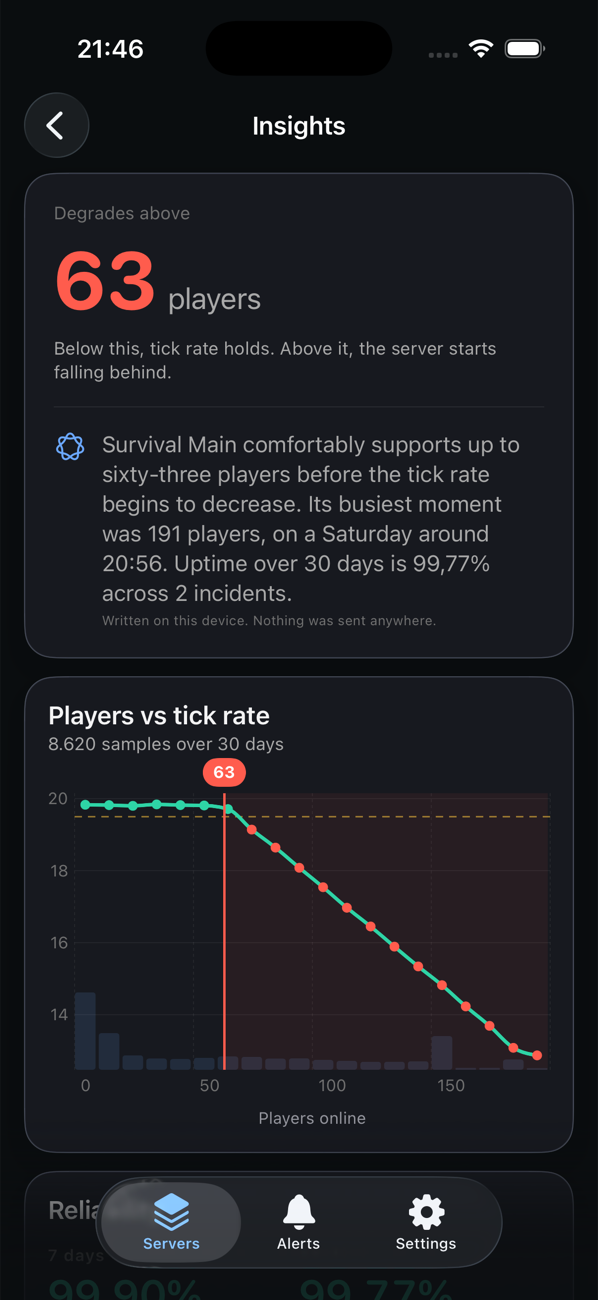
"Degrades above 63 players."
Pulse plots every sample it has of players against tick rate and finds the point where your server stops keeping up. Not a rule of thumb, not someone else's server — yours, measured across weeks of its own history.
If it never degrades, it says so — that is the good answer, and it gets its own headline rather than an empty chart.
The written summary on that screen is composed on your phone. Nothing about your server is sent anywhere to produce it.
Privacy
We collect performance data, not people.
Not a policy we could quietly change later. Pulse only asks the plugin for what the app needs to show you, and almost all of that is aggregate by design.
Aggregates, not records
What the plugin sends back are numbers that describe the server: counts, timings, memory. They say how it is doing, not who was on it.
Player names are never stored
The live list exists just long enough for the app to show it, then it is gone. No UUIDs at any point either — not stored, not hashed, not sent.
The watchlist runs on your server
The plugin compares names locally and sends back only the label that matched. Pulse never learns who else was online.
The full detail is in the privacy policy.
Pricing
Paying buys you more, not access.
Every feature is on every plan. A subscription raises the limits — more servers, more history, more alert rules — and it belongs to you, not to a server.
Free
Every feature, one plugin server.
Free
—
- Plugin servers
- 1
- Ping-only servers
- Unlimited
- History
- 24 hours
- Alert rules, all servers
- 3
- Every feature
- Included
Pro
Most peopleFor a server you actually care about.
$3.99 / month
or $39.99 / year — two months free
- Plugin servers
- 5
- Ping-only servers
- Unlimited
- History
- 90 days
- Alert rules, all servers
- Unlimited
- Every feature
- Included
Network
For a proxy with a lot behind it.
$9.99 / month
or $99.99 / year — two months free
- Plugin servers
- 25
- Ping-only servers
- Unlimited
- History
- 400 days
- Alert rules, all servers
- Unlimited
- Every feature
- Included
Subscriptions are per person, not per server. Five people can follow the same server on the free plan, each with their own alerts.
Ping-only monitoring is unlimited on free. Billing runs through the App Store; monthly and yearly are both available for Pro and Network.
Questions
What people ask first.
Requirements
- Phone
- iPhone and iPad, iOS and iPadOS 26
- Account
- Sign in with Apple — nothing on the server side
- Server
- Spigot, Paper, Velocity and Folia. 1.20+
- Hosting
- Nothing to host, nothing to deploy
- Modded servers
- Not currently supported
Do I need to host anything?
No. Install the plugin on your server; that is it. Nothing to deploy, nothing to keep running, no dashboard of your own to maintain.
Do I need an account?
You sign in to the app with your Apple account, which is all Pulse asks of you. There is nothing to create on the server side — no separate login, no API key to generate and paste.
Does it work with modded servers?
Not currently. The plugin targets Spigot, Paper, Velocity and Folia. 1.20+
Can my staff team use it?
Yes. Anyone you give a code to can follow the server, and each person has their own alert rules and notification settings. Nobody is an "admin" — everyone gets the same view.
What happens if I stop paying?
You keep your data up to the free history window and can follow one plugin server. Nothing is deleted the moment a subscription lapses.
Does it slow my server down?
It samples once every 30 seconds and sends a small batch of numbers — counts, timings, memory. We have not published an overhead figure, because we do not have a measured one.
Do you see my players' names?
No. Names are never written to a database and UUIDs are never collected at all. The watchlist is evaluated on your own server.
Is there an Android version?
Not right now. Pulse runs on iPhone and iPad.
Can I monitor a server I do not control?
Yes — add any address and you get up/down status and response time, free and unlimited. TPS, memory and the rest need the plugin, which needs access to the server.
Stop worrying about your server. It will tell you.
Not an official Minecraft product. Not approved by or associated with Mojang or Microsoft.